

Learning Hub for Leaders
Practical guides, videos, FAQs, and leadership support resources for using Blended Leading inside Microsoft Teams.
Welcome to Blended Leading!
This short guide helps you understand what Blended Leading is, how it supports you as a leader, and what to expect in your first minutes using it.
What is Blended Leading?
Blended Leading is a personal leadership support tool that works directly inside Microsoft Teams.
Instead of generic leadership tips or long training programs, Blended Leading provides short, personalized leadership nudges – practical suggestions you can apply immediately in your daily work.
Think of it as bite-sized mentoring, delivered where you already work.
What will you get from it?
With Blended Leading, you’ll receive:
- Personalized leadership nudges tailored to your role, focus areas, and inputs
- Practical suggestions, not theory or abstract models
- Support in the moment, not weeks after a training
- Very short content (usually under a minute to read)
The goal is simple: help you make small leadership improvements that add up over time.
Where does Blended Leading live?
Blended Leading is embedded directly in Microsoft Teams.
That means:
- No new platform to learn
- No additional login
- No switching between tools
You access it like any other Teams app.
What you don’t need to do
To use Blended Leading, you don’t need to:
- Learn a complex dashboard
- Fill in long questionnaires
- Constantly manage settings
- Share information you’re not comfortable sharing
- Upload data manually if your organization already provides it centrally
You can start small and personalize more only if and when you want to.
How Blended Leading supports you (in simple terms)
Blended Leading combines:
- Leadership data provided either by you or by your organization, depending on setup
- Your company’s leadership model and values
- AI-supported analysis to generate relevant, short nudges
Depending on your organization, some leadership data (such as 360° feedback or assessments) may already be provided centrally, so you don’t need to upload it yourself.
It does not monitor your chats, emails, or conversations.
Is this an evaluation or monitoring tool?
No. Blended Leading is not:
- A performance evaluation system
- A monitoring or surveillance tool
- A reporting tool for managers or HR
It is designed to support your individual development as a leader. You remain in control of what you share and how you use it.
What is a Nudge?
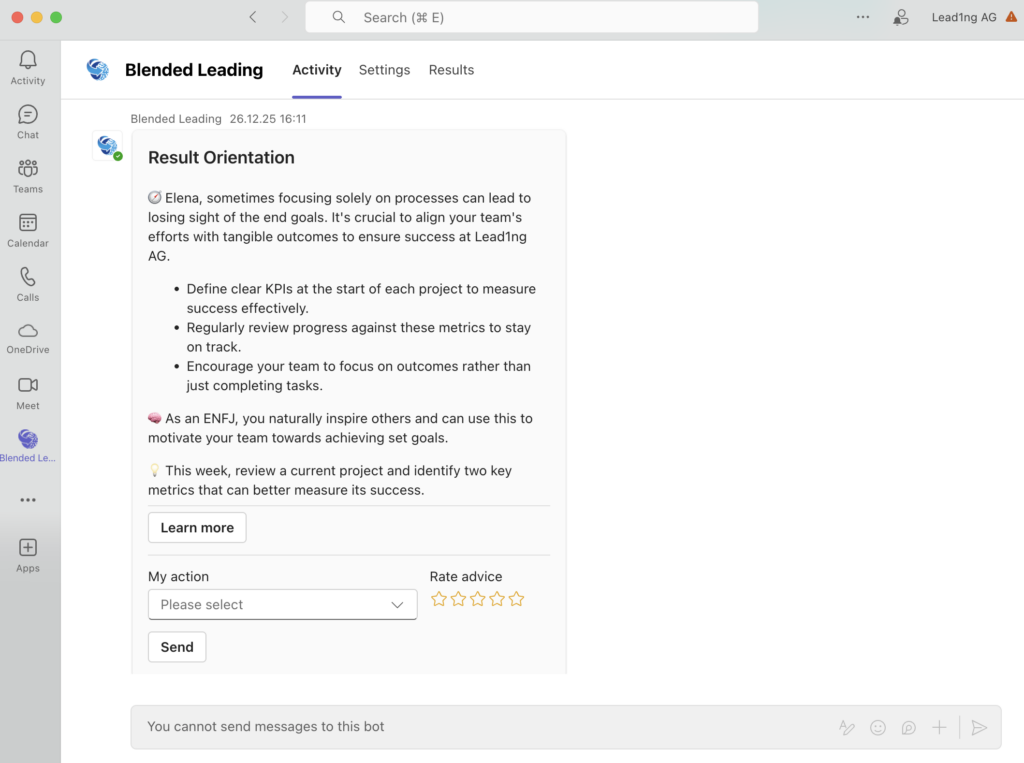
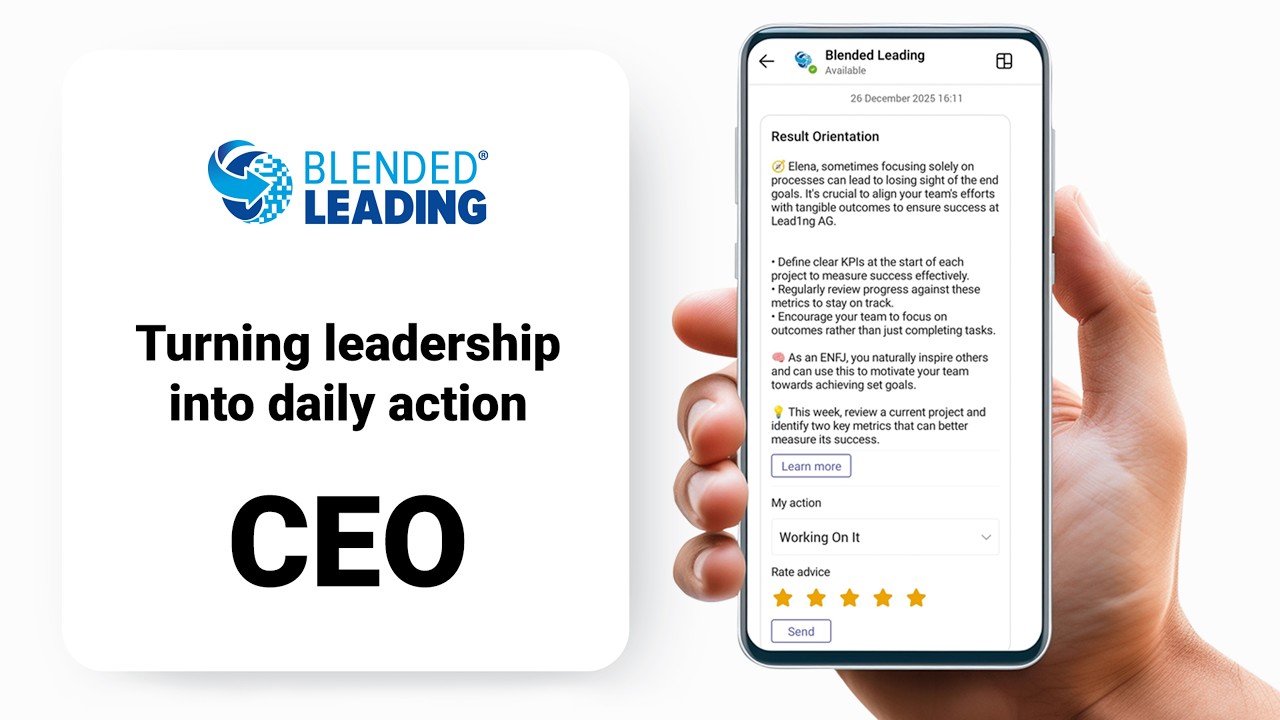
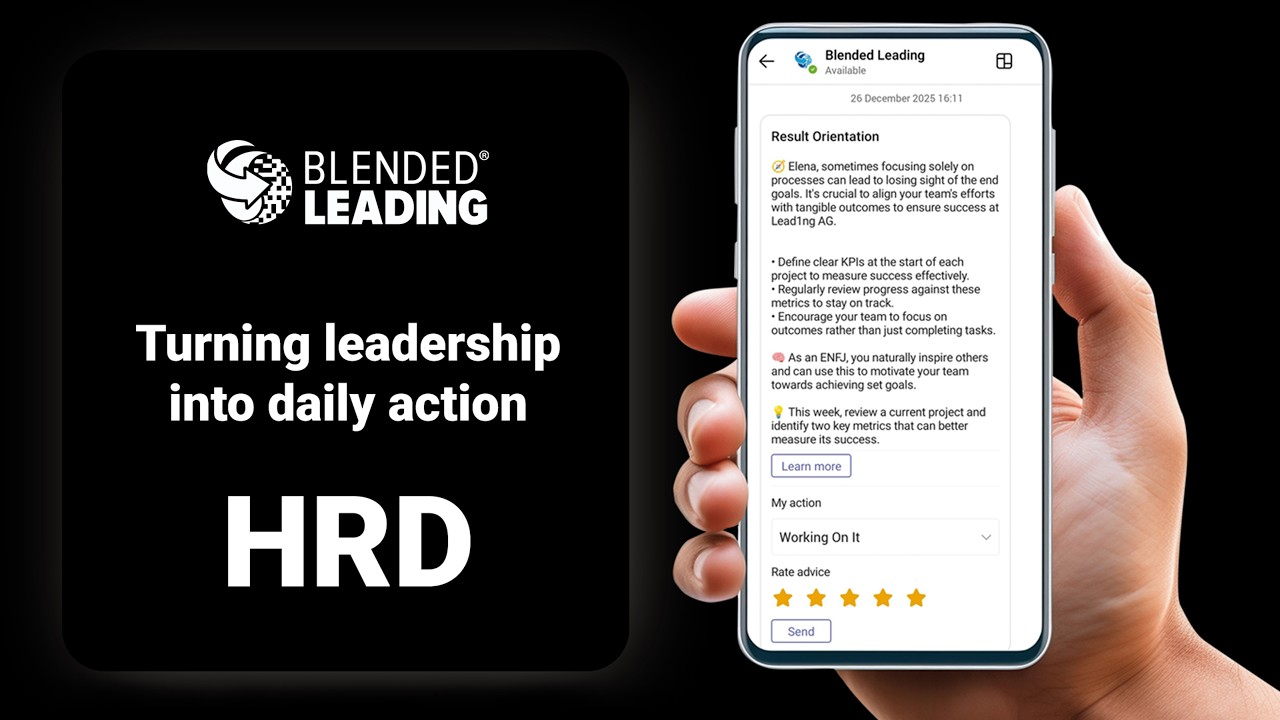
A nudge is a short, practical piece of leadership advice designed to help you act more effectively in the moment.
It’s not a task, a reminder, or an evaluation. It’s a small suggestion that fits into your real workday.
What does a nudge look like?
A nudge is usually:
- A short message (30–60 seconds to read)
- Focused on one specific leadership behavior
- Easy to apply immediately
Example: “In your next team meeting, try asking one open question before sharing your own solution. This can increase engagement and ownership in the discussion.”
No theory. No long explanations. Just something you can try today.
When do nudges appear?
You receive nudges:
- Directly in Microsoft Teams
- At the day and time you choose
- At a frequency that fits your rhythm
You stay in control of: – When nudges are sent – How often you receive them.
How is a nudge different from reminders or tasks?
You receive nudges:
- A to-do item
- A performance target
- A notification about what you must do
A nudge is:
- A suggestion
- An invitation to reflect or try something new
- Support, not pressure
You decide whether and how to act on it.
Where do nudges come from?
The nudge is created by combining leadership data that is provided either by you or by your organization, depending on how Blended Leading is set up in your company:
- Leadership inputs (such as focus areas, reports, or profiles) that are either provided by you or centrally by your organization
- Your organization’s leadership competency model/principles and values
- AI-supported analysis that matches your situation with relevant leadership behaviors
In organizations with a centralized setup, you may receive fully personalized nudges without needing to upload any data yourself.
This ensures nudges are: – Relevant to your context – Aligned with your company’s expectations – Adapted to you as an individual leader
What nudges are not based on
Blended Leading does not generate nudges based on:
- Your private chats or messages
- Your emails or meetings
- Monitoring your daily communication
Nudges are based only on explicit inputs and configurations – never on hidden observation.
Do nudges replace training or coaching?
No. Nudges are meant to complement, not replace:
- Leadership training programs
- Coaching or mentoring
- Formal development initiatives
They help bridge the gap between: “I learned this in training” and “I actually apply this at work.”
Can nudges improve over time?
Yes. You can:
- Rate nudges as helpful or not
- Adjust your focus areas
- Add or remove inputs
Over time, Blended Leading adapts and becomes more precise and useful for you.
In short
A nudge is:
- Short
- Practical
- Personalized
- Supportive
It’s a small step toward becoming a more effective leader – without adding complexity to your day.
Your First 10 Minutes with Blended Leading
This guide walks you through your first 10 minutes with Blended Leading. There’s no pressure to set everything up at once. You can stop at any point and come back later.
Minute 0–1: Open Blended Leading in Microsoft Teams
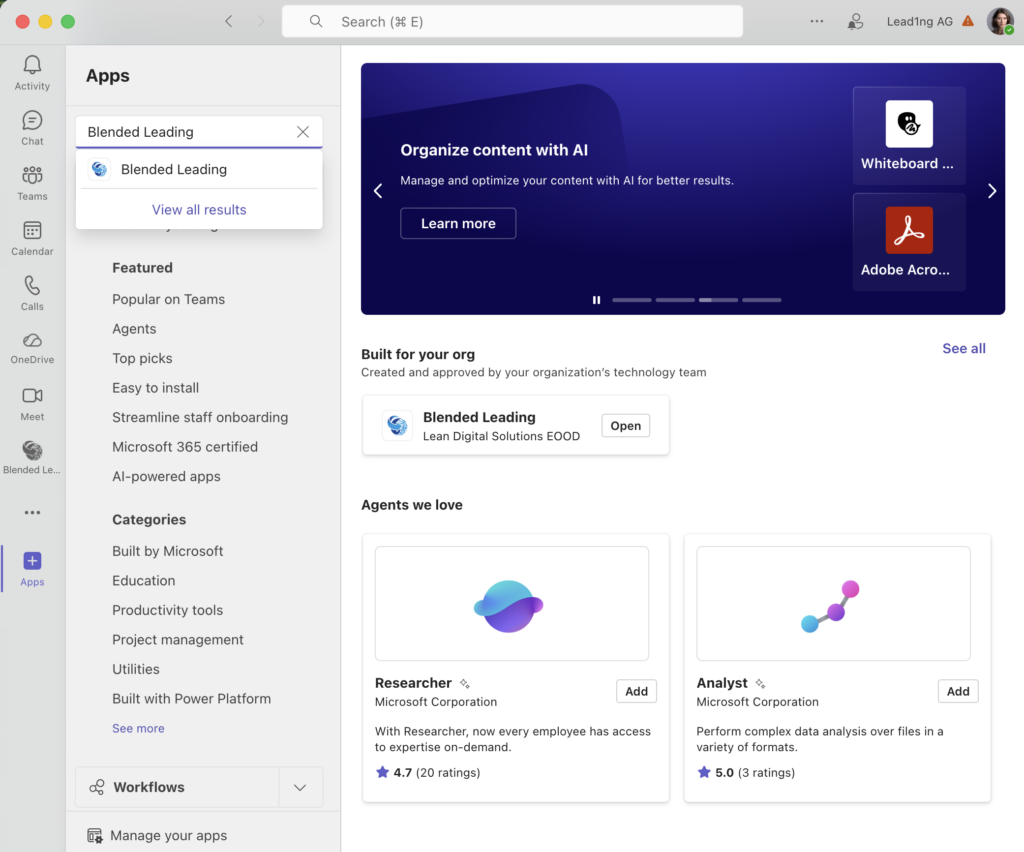
- Open Microsoft Teams
- Find Blended Leading in your apps list
- Open the app
That’s it. No additional login is required.
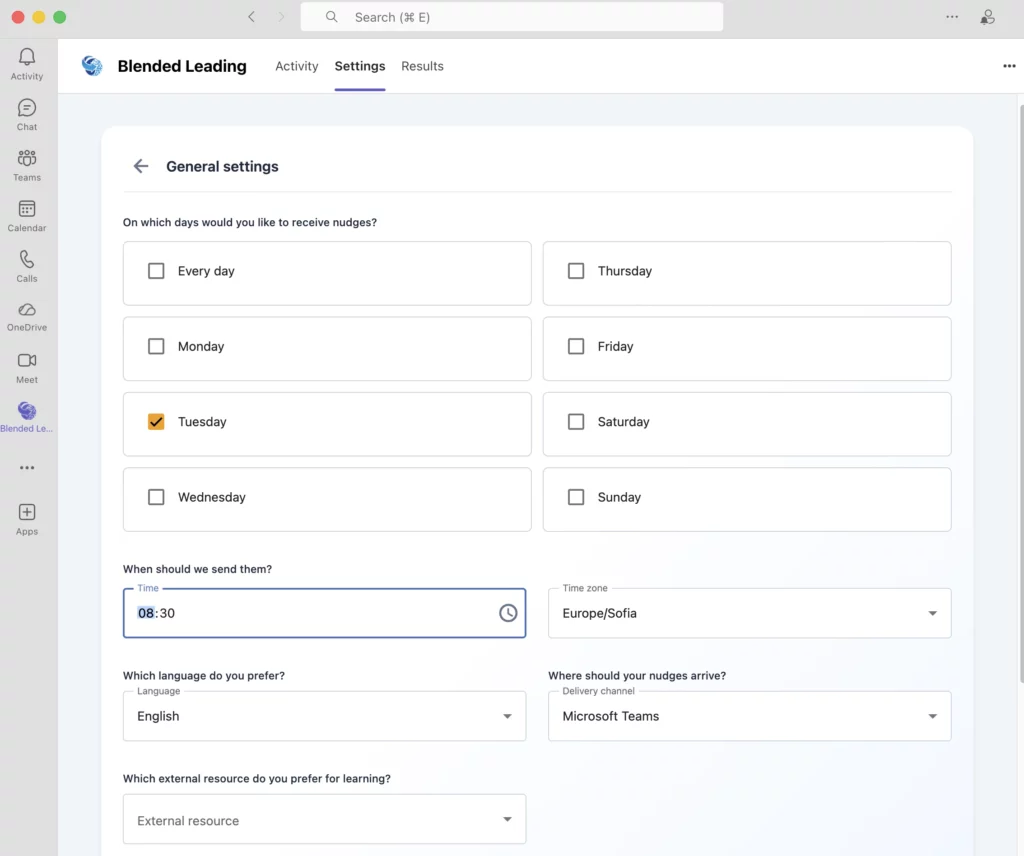
Minute 1–3: Check Your General Settings
Before anything else, Blended Leading asks for a few basic preferences.
Here you can choose: – Language for your nudges – Day(s) of the week you want to receive advices – Time of day that fits your schedule
Tip: Pick a time when you’re likely to have a quiet moment (for example, early morning or late afternoon).
You can change these settings anytime.
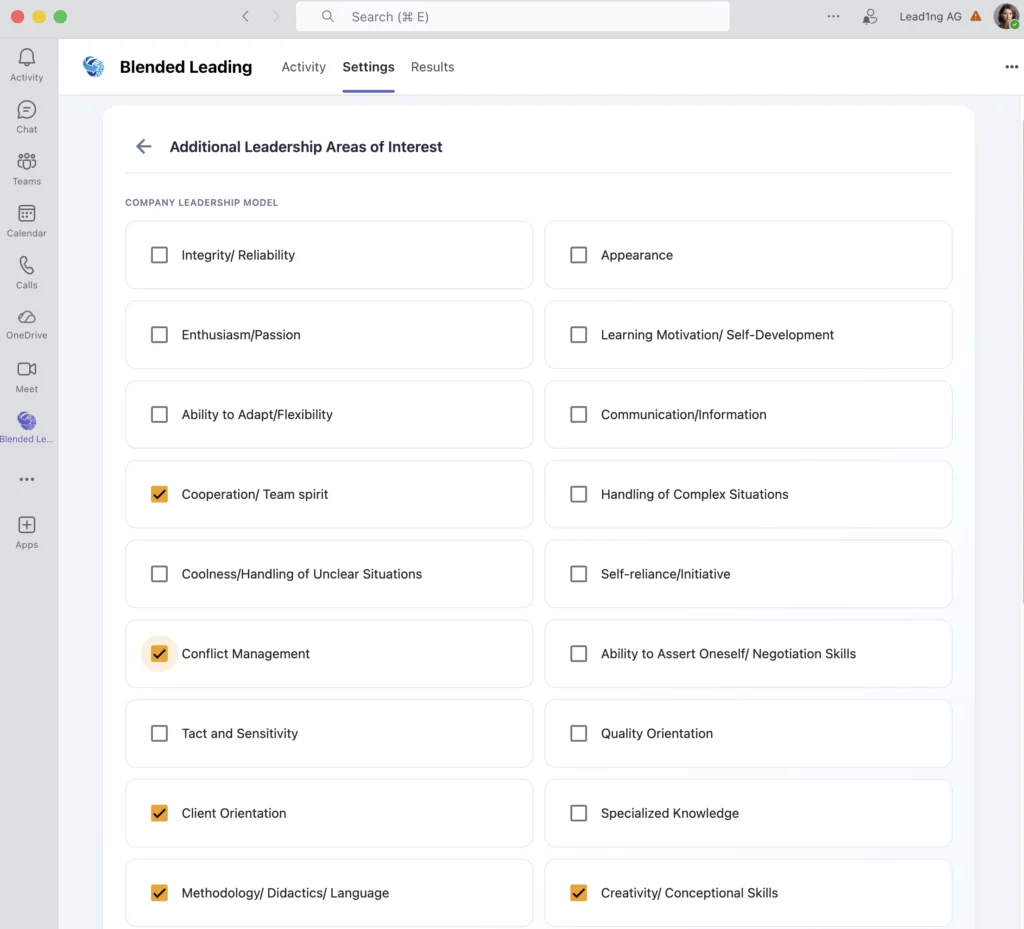
Minute 3–5: Choose Your Leadership Focus Areas
Next, you’ll be asked to select leadership areas you want to focus on.
These might include topics such as: – Communication – Prioritization – Resilience – Motivation and engagement
Choose the areas that feel most relevant right now. You don’t need to select everything. Fewer focus areas often lead to more precise nudges.
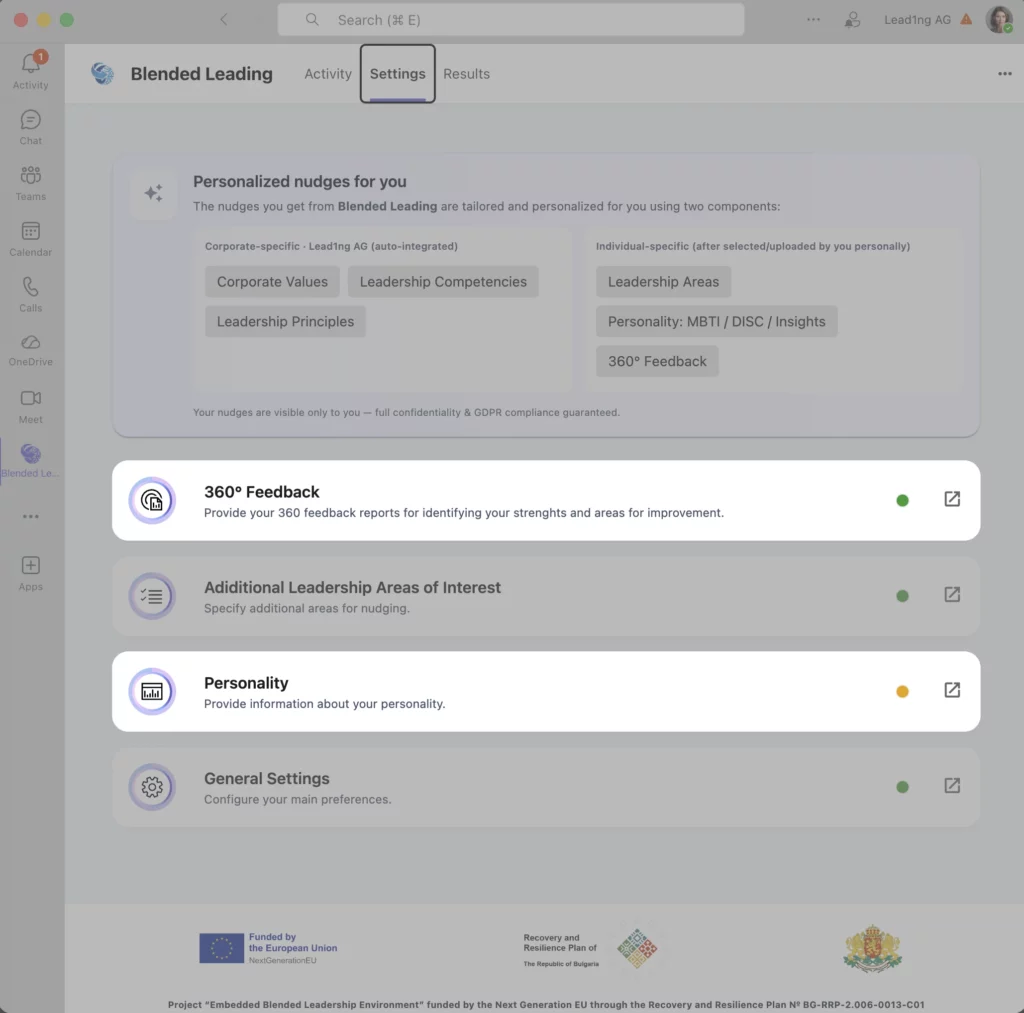
Minute 5–7: Decide What You Want to Add (Optional)
At this point, Blended Leading may invite you to add additional information — unless this data is already provided centrally by your organization — such as:
- A 360° feedback report
- A psychometric profile (e.g. MBTI, DISC, Insights)
These steps are optional and organization-dependent. If your company provides this data centrally, you don’t need to take any action here.
If you skip them now:
– You’ll still receive nudges
– You can add information later (if allowed in your setup)
Minute 7–9: Review What You’ve Set Up
Before finishing, take a quick look at: – When you’ll receive nudges – What leadership areas you selected
If it feels “good enough,” you’re ready. There’s no need to optimize everything on day one.
Minute 9–10: That’s It
Once your settings are saved:
- Blended Leading starts working in the background
- You’ll receive your first nudge at the chosen time
From now on, your only task is simple: > Read the nudge. Decide if it’s useful. Try it – or ignore it.
A few reassuring notes
- You can change all settings later
- You can pause or stop nudges if needed
- You stay in control of what you share
Blended Leading is designed to fit into your workday – not the other way around.
The Basic Settings
Blended Leading is designed to stay out of your way. The basic settings simply help it fit your personal rhythm and priorities.
You don’t need to fine-tune everything. Simple choices work perfectly.
What are the basic settings?
The basic settings control:
- When you receive nudges
- How often you receive them
- What leadership topics they focus on
That’s it. There are no complex configurations or technical options. Some options may be preconfigured by your organization and not editable individually.
When do you want to receive nudges?
You can choose:
- The day(s) of the week
- The time of day
Pick a moment when you’re most likely to: – Pause briefly – Reflect – Try something new
Tip: Many leaders choose early mornings, just before meetings, or late afternoons.
You can change this anytime.
How often will you receive nudges?
Blended Leading focuses on quality over quantity. Receiving fewer, more relevant nudges is usually more effective than frequent notifications. If at any point it feels like too much or too little, you can adjust the frequency or pause nudges entirely.
What topics will nudges focus on?
Your nudges are based on leadership focus areas that are either selected by you or pre-defined by your organization, depending on setup.
Examples include: – Communication – Prioritization – Resilience – Motivation and engagement
Tips for choosing focus areas: – Start with what matters right now – Choose fewer areas for clearer guidance – You can always change them later
Language settings
You can choose the language in which nudges are delivered. Blended Leading supports multiple languages, depending on your organization’s setup. Language can be changed at any time.
Can I change my settings later?
Yes – always.
You can: – Change timing and frequency – Update focus areas – Switch language – Pause nudges completely
Nothing is locked in.
A simple rule of thumb
If you’re unsure how to set things up, remember this:
Choose a time you won’t ignore, and topics you actually care about.
That’s enough for Blended Leading to be useful.
Understanding Your Results & Insights
The Results area helps you see what Blended Leading is learning from your inputs and why you receive certain nudges.
It is designed for reflection and transparency, not evaluation.
What is the Results area?
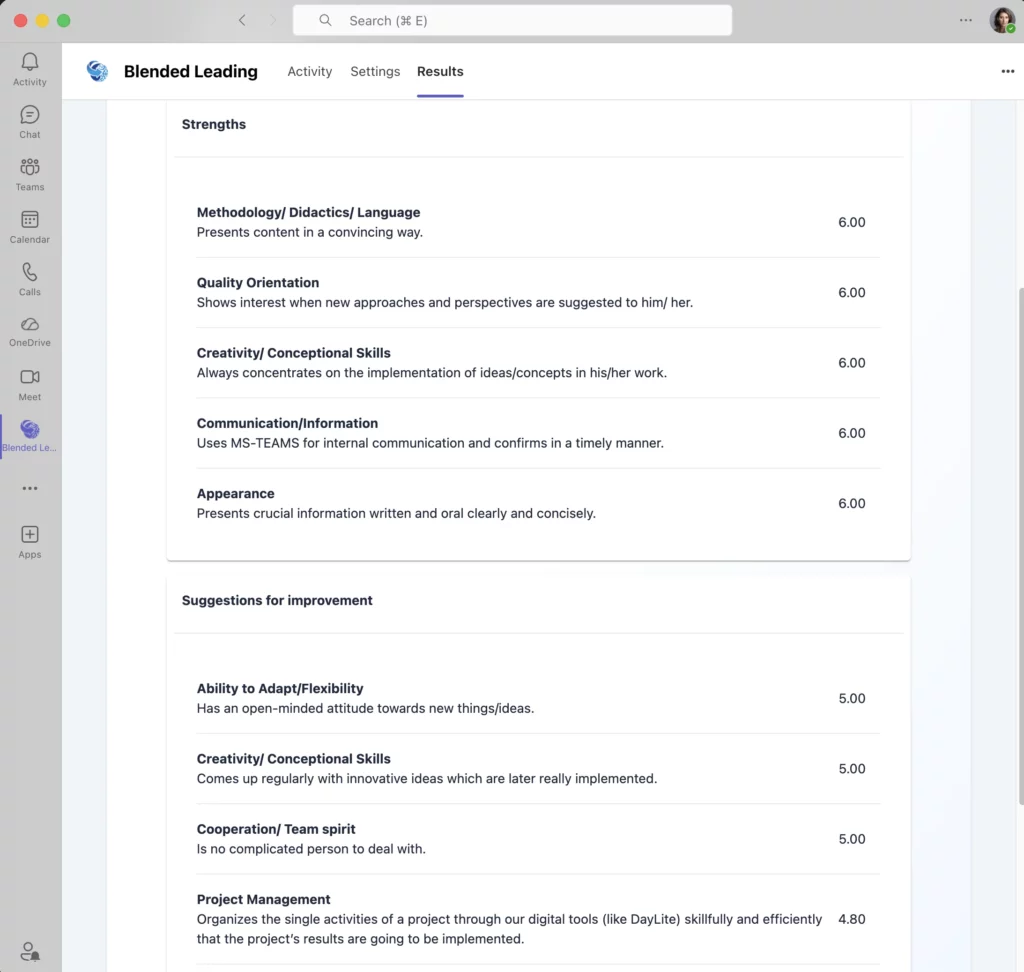
The Results area shows the Nudge Drivers behind the nudges you receive.
Nudge Drivers are structured insights derived from different types of leadership data. They explain why a specific nudge is generated and which perspective it is based on.
The Results area is designed for transparency and reflection, not evaluation.
What kind of results will you see?
Depending on your organization’s setup and available data, the Results area may show insights from three different Nudge Driver types:
- Individual Results Drivers
- Organizational Benchmark Drivers (if enabled)
- Text Analysis Drivers from open feedback (if available)
Each driver type generates its own set of nudges, independently from the others.
Not all organizations enable all three driver types.
Understanding Nudge Drivers & charts (at a glance)
1. Individual Results Drivers
These drivers are based on your individual leadership results, such as: – Scores or patterns from feedback reports – Repeated signals across leadership areas
They help answer questions like: – Where do my individual results show consistent strengths? – Where do development signals appear repeatedly?
Nudges generated from these drivers focus purely on your personal leadership profile.
2. Organizational Benchmark Drivers (if enabled)
These drivers are based on a comparison between your individual results and an anonymized organizational benchmark.
They help surface questions like: – Where do my results differ from typical patterns in the organization? – Which leadership behaviors may be especially important in my context?
Important: – Benchmarks are always aggregated and anonymized – No ranking or league tables exist
Nudges from benchmark drivers focus on contextual alignment, not performance.
3. Text Analysis Drivers (open feedback)
These drivers are based on the analysis of open text responses in leadership reports, where available.
The system looks for: – Recurring themes – Emotional tone (positive, neutral, challenging) – Links between comments and leadership behaviors
These insights help generate nudges that address how leadership is experienced, not just measured.
Trends over time
Trend views show how insights change across time periods.
This helps you reflect on: – Whether certain topics become more or less prominent – How focus areas evolve after applying nudges
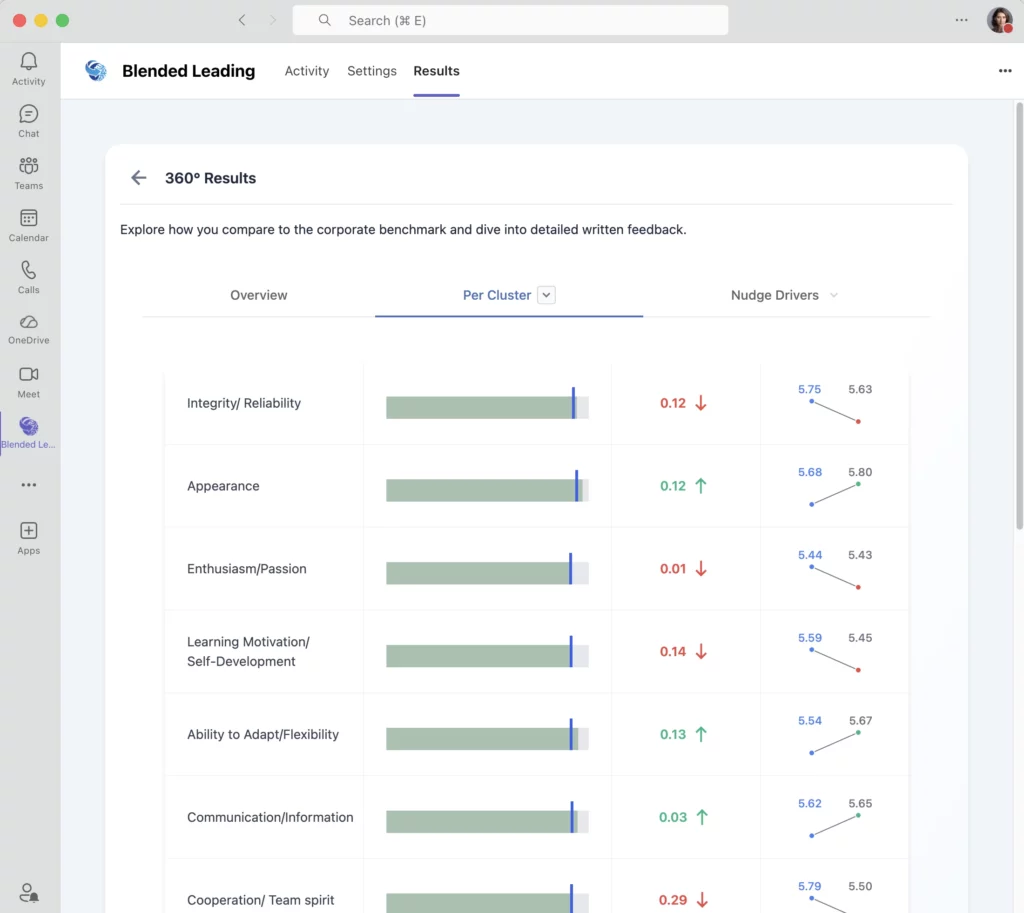
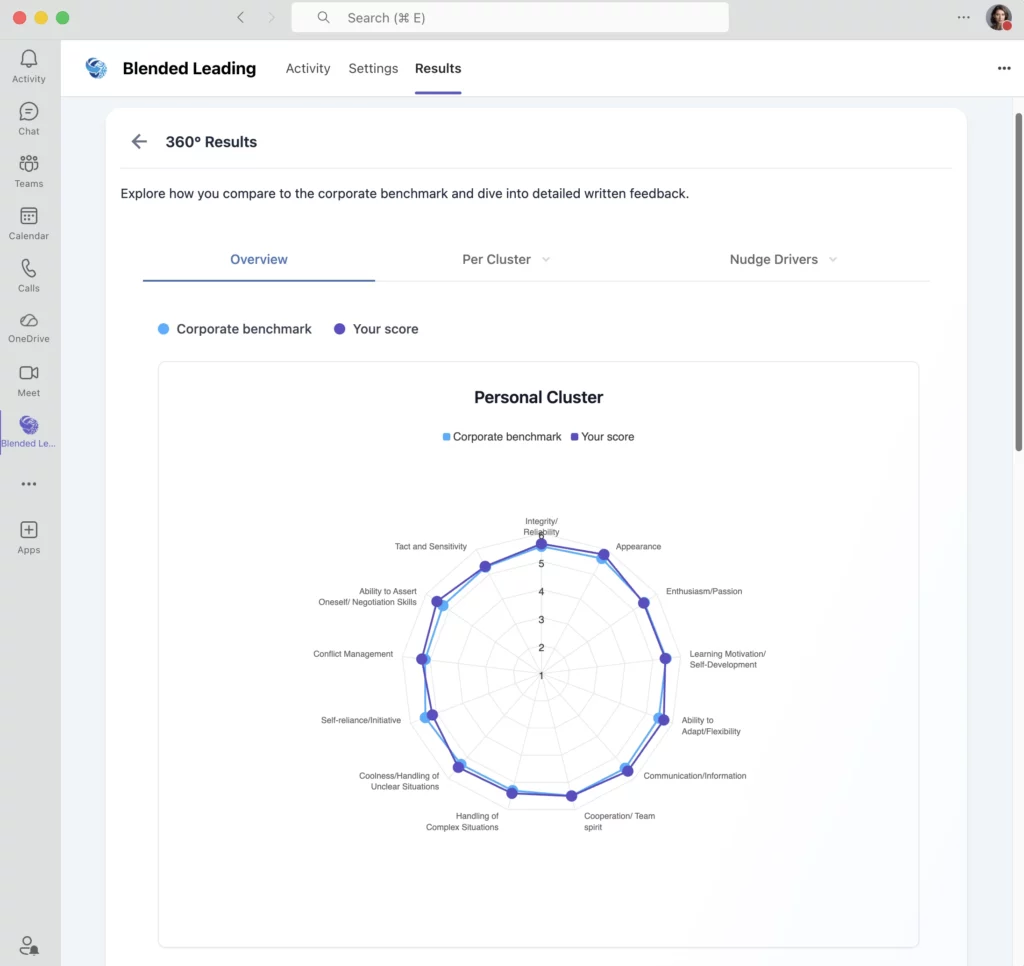
Organizational comparison (if enabled)
Some organizations enable benchmark views, which compare your results against: – Anonymized organizational averages
These comparisons: – Never expose individual data – Are meant for orientation, not ranking
How Nudge Drivers generate nudges
Each Nudge Driver type works independently.
This means: – You may receive multiple nudges in the same period – Each nudge clearly relates to a specific driver – Leadership focus areas do not influence which driver generates a nudge
Nudges are generated separately based on: – Individual Results Drivers – Organizational Benchmark Drivers (if available) – Text Analysis Drivers (if available)
Your preferences (timing, language, frequency) still apply to all nudges.
What the Results area is NOT
The Results area is not:
- A performance scorecard
- A ranking against colleagues
- A summary used for evaluation or promotion decisions
Even when organizational benchmarks are enabled, insights are used only to guide nudges, not to judge performance.
Why transparency matters
By showing you the insights behind nudges, Blended Leading:
– Builds trust in how recommendations are generated
– Helps you understand why certain nudges appear
– Gives you more control over your development journey
In summary
The Results area helps you:
- Understand your leadership patterns
- Track change over time
- See the logic behind nudges
All insights are there to support learning, not judgment.
How Nudge Drivers, Results & Nudges Work Together
Blended Leading is designed to be transparent and easy to understand.
This article explains how Results, Nudge Drivers, and Nudges are connected – so you always know why you are receiving a specific nudge.
The big picture (in simple terms)
Blended Leading follows a clear flow:
- Leadership data is available (from you and/or your organization)
- Nudge Drivers analyze this data from different perspectives
- Results visualize the drivers so you can understand them
- Nudges are generated based on each driver
- Nothing happens in the background without being reflected in the Results area.
Step 1: Leadership data (the input)
Depending on your organization’s setup, leadership data may come from:
- Your individual leadership results
- Centrally provided reports (e.g. 360° feedback)
- Open text responses in reports
- Other leadership development inputs defined by the organization
This data is the starting point, not a judgment.
Step 2: Nudge Drivers (the logic)
Blended Leading uses three independent Nudge Driver types.
Each driver looks at the data from a different angle and works on its own.
1. Individual Results Drivers
These drivers focus only on your individual leadership results.
They look for:
- Repeated patterns
- Strong or emerging signals
- Areas where small changes could have impact
Nudges from these drivers are about your personal leadership profile.
2. Organizational Benchmark Drivers (if enabled)
These drivers compare your individual results with anonymized organizational benchmarks.
They help highlight:
- Where your patterns differ from typical organizational trends
- Which leadership behaviors may be especially relevant in your context
Important:
- Benchmarks are always anonymized and aggregated
- There is no ranking or scoring of individuals
Nudges from these drivers focus on context and alignment, not performance.
3. Text Analysis Drivers (if available)
These drivers analyze open text feedback in leadership reports.
They look for:
- Recurring themes
- Emotional tone (positive, neutral, challenging)
- Links between comments and leadership behaviors
These nudges address how leadership is experienced, not just measured.
Step 3: Results (the transparency layer)
The Results area shows you:
- Which Nudge Drivers are active
- What patterns or signals they detect
- How insights evolve over time
Results help you understand:
“Why am I receiving this type of nudge right now?”
Step 4: Nudges (the action)
Each Nudge Driver generates its own nudges, independently of the others. This means:
- You may receive nudges from different drivers
- Nudges may focus on different aspects of leadership
- Multiple nudges can coexist without conflict
Leadership focus areas do not control which driver generates nudges. Your preferences (timing, language, frequency) apply to all nudges equally.
Why this separation matters
This separation ensures that:
- Insights are not mixed or oversimplified
- Different perspectives stay clear
- Nudges remain specific and relevant
- You can trust the logic behind recommendations
What this is NOT
This process is not:
- A performance evaluation pipeline
- A ranking or scoring mechanism
- An automated decision-making system about you
It is a support loop designed to help you reflect and act.
In summary
- Data provides the input
- Nudge Drivers interpret it from different perspectives
- Results make this interpretation visible
- Nudges translate insights into small, practical actions
Blended Leading keeps this loop open and understandable – so support never feels like a black box.
Rating Nudges & Improving the Experience
Blended Leading improves over time – and your feedback plays an important role in that process.
This article explains why rating nudges matters, how it works, and what your ratings are (and are not) used for.
Why rating nudges matters
Nudges are designed to be helpful, relevant, and practical.
By rating nudges, you help Blended Leading:
- Understand what is useful for you
- Fine-tune future nudges
- Improve relevance and tone over time
Even simple feedback helps the system learn.
How to rate a nudge
Each nudge can be rated using a five-star rating.
On desktop, you can select half stars (e.g. 3.5  )
)
On mobile, you can select full stars only
In addition to the star rating, you can also choose an action status that reflects how you’re engaging with the nudge.
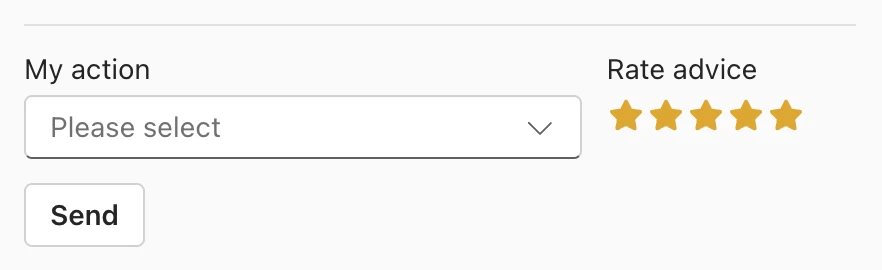
Choosing an action status
For each nudge, you can optionally select one of the following action statuses:
- Not Needed Right Now
- Thinking About It
- Planning To Do It
- Working On It
- Already Done
These statuses help you reflect on where you are and help Blended Leading understand how nudges are landing in practice.
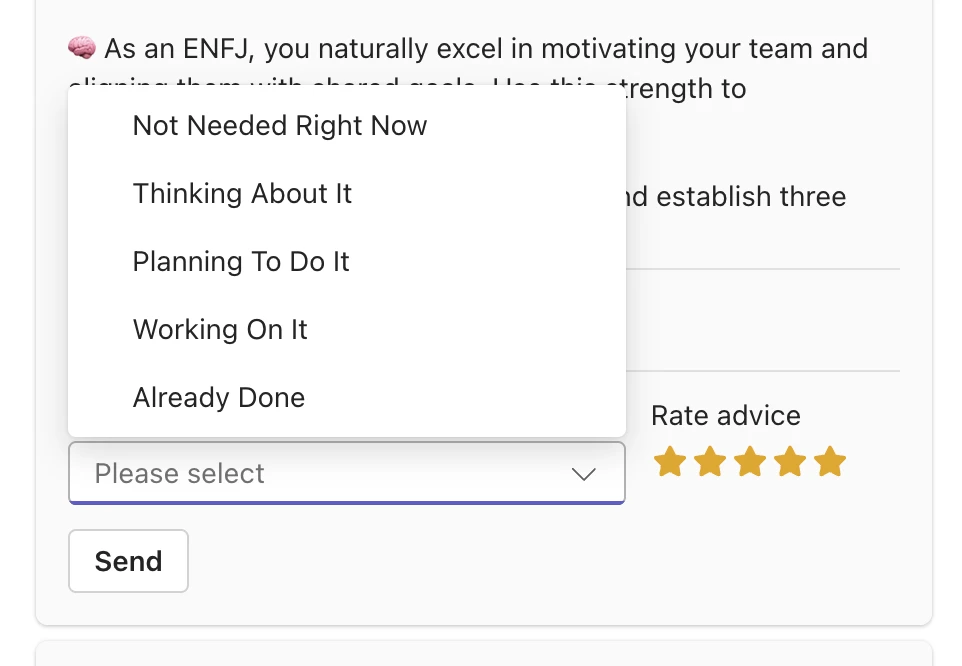
Sending your feedback
To submit your feedback:
- Select a star rating
- (Optional) Select an action status
- Click Send
Your feedback is only sent once you press Send.
What happens when you send feedback
When you send a rating and/or action status, it is used in two ways:
1. Improving nudges for you
- Helps fine-tune relevance, tone, and timing
- Improves future nudges you receive
2. Anonymous analysis for the organization
- Ratings and action statuses may be included in aggregated, anonymous reports
- No individual-level data is visible to HR or managers
This helps organizations understand overall usefulness – without evaluating individuals.
What ratings and action statuses are NOT used for
It’s important to be clear about this.
Your ratings and action statuses are not used to:
- Evaluate your performance
- Measure compliance or completion
- Rank or compare leaders
- Report individual behavior to managers or HR
All organizational reporting is aggregated and anonymized.
Do ratings influence Nudge Drivers?
Ratings do not change which Nudge Drivers are active.
Remember:
- Nudge Drivers are based on data and insights
- Ratings help improve how nudges are delivered, not which drivers generate them
This keeps the system transparent and predictable.
What if I don’t rate nudges?
That’s perfectly fine.
- You’ll still receive nudges
- The system will still work
- Nothing is blocked or limited
Rating nudges simply helps the experience adapt faster.
A simple way to think about it
If a nudge feels:
- Useful → rate it
- Irrelevant → rate it
- Neutral → ignore it
There’s no right or wrong response.
In summary
- Rating nudges is optional
- Ratings help improve relevance
- Ratings are never used for evaluation
- You stay fully in control
Your feedback helps Blended Leading support you better – without adding effort or pressure.
Your Data, Privacy & GDPR
Your trust matters.
Blended Leading is designed to support your development as a leader without compromising your privacy. This article explains, in clear and simple terms, how your data is handled and protected.
The short version
- Blended Leading is not a monitoring or surveillance tool
- You decide what data you share
- Your individual data is not visible to your manager
- All data is handled in line with GDPR and EU data protection standards
What data does Blended Leading use?
Blended Leading uses data that is explicitly provided, either:
- By you as an individual leader, or
- By your organization, depending on how Blended Leading is configured in your company.
This organizational setup may differ from one client to another.
Depending on your organization, data used may include: – Leadership focus areas (selected by you or pre-defined) – 360° feedback reports – Psychometric profiles – Other leadership development inputs defined by the company
If certain data is centrally provided by your organization, you are not required to upload it yourself.
What data is NOT used?
Blended Leading does not:
- Read or analyze your private chats
- Monitor your Microsoft Teams messages
- Access your emails or calendar content
- Track your daily communication or behavior
There is no hidden data collection.
Who can see your data?
Visibility of data depends on your organization’s Blended Leading setup.
You
You always have access to: – Your own nudges and insights – Your leadership development experience inside Blended Leading
Depending on the setup, you may also see: – Data you uploaded yourself, or – Data provided centrally by your organization
Your manager
- Cannot see your individual nudges
- Cannot monitor your behavior or daily usage
Access to individual development data is never intended for managerial control, even when data is centrally managed.
HR and the organization
There are two possible models, defined by your organization:
- Individual-managed model – Leaders upload and manage their own data – HR sees only aggregated and anonymized insights
- Organization-managed model – HR or L&D may upload leadership data centrally (e.g. 360° reports) – Data is used to generate personalized nudges – Individual results are still handled with strict access controls
In both models: – Aggregated and anonymized insights may be used for organizational development – Individual nudges remain personal and are not used for performance evaluation
How is your data protected?
Blended Leading follows strict security and privacy principles:
- All data is stored and processed within the EU
- Personal data is handled according to GDPR
- Sensitive data is encrypted
- AI models work with pre-anonymized data where possible
Your organization remains the owner of its data at all times.
How does AI fit into this?
AI is used to: – Analyze inputs you provide – Match them with relevant leadership behaviors – Generate short, helpful nudges
AI is not used to: – Evaluate your performance – Rank or score you as a leader – Make decisions about you
AI supports you – it doesn’t judge you.
Do I have to consent?
Yes. When you upload personal reports or profiles, you’re asked for explicit consent in line with GDPR requirements.
You can: – Withdraw consent – Remove uploaded data – Stop using Blended Leading at any time
In summary
Blended Leading is built on one clear principle: Your development should feel safe, supportive, and under your control. If something doesn’t feel right, you can always pause, adjust, or stop.
FAQ
This FAQ answers the most common questions from a leader’s perspective.
It focuses on everyday use, trust, and value – not on HR or IT administration.